News
No blog post yet.
How Laser Wavelength Affects What You Can Engrave
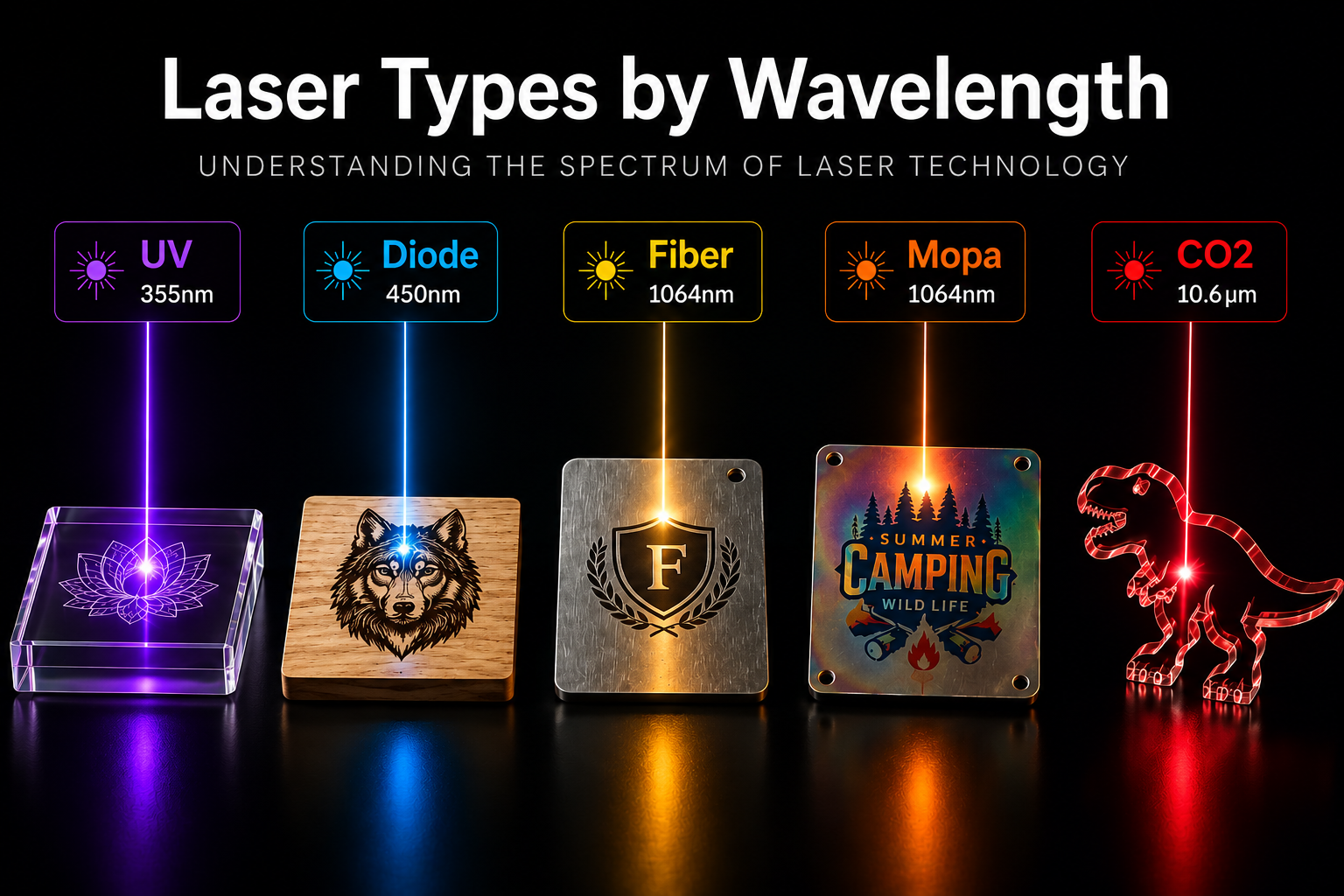
A laser can only process a material when that material absorbs the laser's light. If the beam is reflected by the surface or passes through it without being absorbed, the laser cannot effectively transfer energy to the material, regardless of how powerful the machine is.
The five main laser sources operate at very different wavelengths:
| Laser Source | Wavelength | Position on the Spectrum |
|---|---|---|
| UV | 355 nm | Ultraviolet |
| Blue Diode | 450 nm | Visible Blue |
| Fiber | 1064 nm | Near Infrared |
| MOPA | 1064 nm (pulse-tunable) | Near Infrared |
| CO₂ | 10,600 nm (10.6 µm) | Far Infrared |
This difference in wavelength explains many of the major differences in what each laser can and cannot process.
Why CO₂ lasers cut wood but struggle with bare metal. Organic materials such as wood, acrylic, leather, paper, and fabric absorb 10.6 µm infrared light very effectively. This allows a CO₂ laser to convert its energy into heat efficiently for cutting and engraving. Metals behave very differently. Highly polished metals, such as aluminum, can reflect most of the CO₂ laser's wavelength, meaning much less energy is absorbed by the surface.
Why fiber lasers are excellent for metal but not wood. At 1064 nm, the situation changes considerably. Many metals absorb near-infrared light much more effectively, making fiber lasers highly suitable for marking and engraving materials such as stainless steel. Wood and some clear plastics, however, interact very differently with this wavelength and may allow much of the beam to pass through rather than absorbing enough energy for effective processing.
Why diode lasers have difficulty with clear acrylic. Clear acrylic allows much of the 450 nm blue laser light to pass through instead of absorbing it. As a result, a blue diode laser may struggle to cut or engrave transparent acrylic. Dark or black acrylic behaves differently because its pigments absorb blue light much more effectively, allowing the laser to transfer its energy into the material.
Why UV lasers are often described as "cold" processing. UV lasers operate at a much shorter wavelength of 355 nm. Their high-energy photons can interact directly with molecular bonds, allowing material to be removed with significantly less heat compared with conventional thermal processing. This produces a very small heat-affected area, making UV lasers particularly useful for delicate materials such as glass, thin plastics, and electronic or circuit-board components that could crack, deform, or melt under stronger infrared heat.
Wavelength is only one of the two major factors that determine how a laser machine performs. The second is how the laser beam is delivered and moved across the workpiece. For that part of the equation, gantry and galvo motion systems play an important role in determining speed, working area, and engraving performance.
CO₂ Laser Engravers
Wavelength: 10.600 µm (10.6 µm) · Far-infrared
CO₂ laser engravers are one of the most established and widely used laser technologies on the market. The laser is produced inside a sealed tube containing a CO₂-based gas mixture, then directed to the work area through a system of mirrors and a focusing lens.
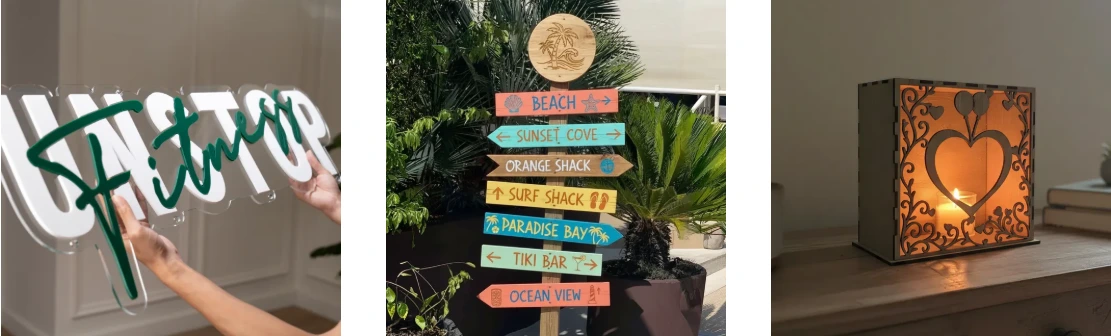
Because organic materials absorb 10.6 µm so effectively, CO₂ lasers are particularly well suited to cutting and engraving non-metal materials. They remain one of the most versatile choices for applications involving wood, acrylic, leather, fabric, paper, and other organic materials.
What a CO₂ laser engraver does well
- Cuts plywood, MDF, hardwood, and bamboo efficiently, including thicker sheets where sufficient power is available.
- Cuts clear and colored acrylic, producing smooth, polished-looking edges.
- Engraves and cuts materials such as leather, paper, cardstock, felt, fabric, cork, and suitable rubber.
- Creates frosted effects on glass and can engrave certain ceramics and stone.
- Offers excellent cutting speed and value for non-metal materials, making it a strong choice when cutting is a major part of the workflow.
What a CO₂ laser engraver cannot do
- It does not directly mark bare metals effectively. Stainless steel, aluminum, brass, and copper reflect the CO₂ wavelength. Metal marking generally requires a suitable marking compound or coating, adding both material cost and an additional cleanup step.
- It is not designed for extremely fine micro-marking. Fiber and UV lasers can achieve much finer detail on small components and specialized materials.
- It should never be used to process PVC or vinyl. These materials can release hazardous chlorine-containing fumes that can harm the operator and corrode or damage the machine.
Typical power and price
Desktop and small-business CO₂ laser machines commonly fall in the 40W–150W range, with prices often around $2,000–$8,000, depending on the machine, working area, features, and accessories. Higher power generally means faster processing and greater cutting capability, rather than automatically producing finer engraving.
Best suited to
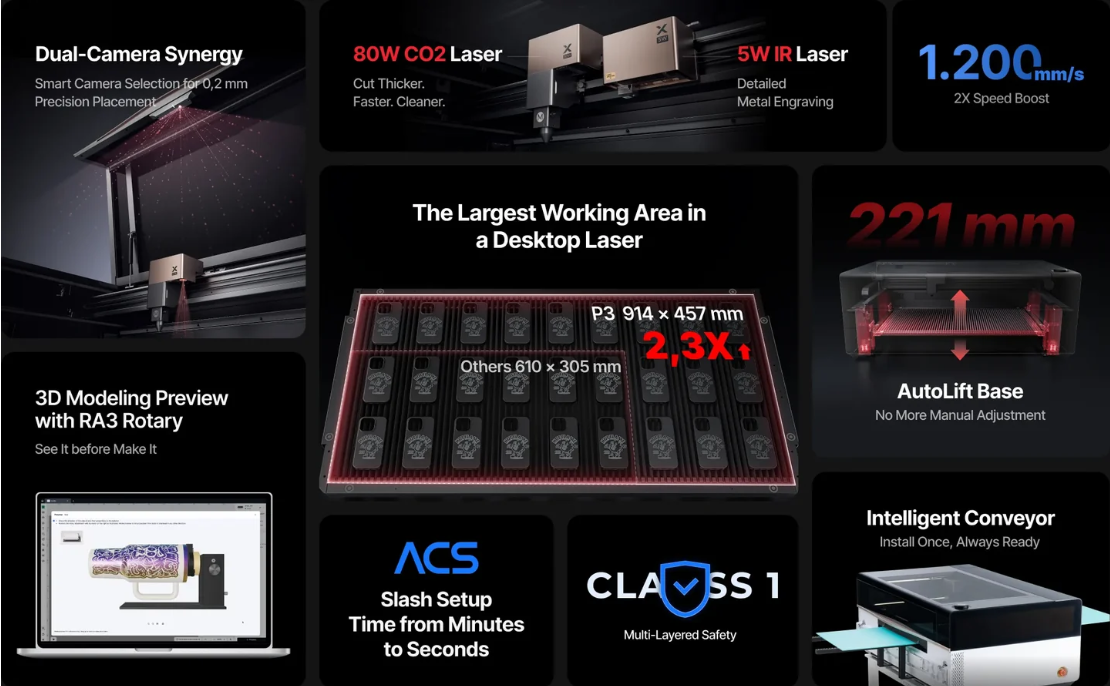
CO₂ lasers are especially well suited for sign making, home décor, model making, packaging prototypes, custom products, and laser-cut items sold through platforms such as Etsy and Shopify. They are an excellent choice when the primary requirement is cutting and engraving sheet-based non-metal materials. In xTool's lineup, the xTool P3 represents this category.
Blue Diode Laser Engravers
Wavelength: ~450 nm · Visible blue
Blue diode laser engravers produce their beam directly from a semiconductor diode, without the gas tube used in CO₂ systems or the complex optical path found in other laser technologies. This straightforward design keeps the machines compact, affordable, and relatively easy to maintain.
Their low cost and simple construction are a major reason diode lasers have become so popular with hobbyists, makers, and small businesses. They offer an accessible way to start laser engraving while still providing useful cutting and engraving capabilities across a range of common materials.
What a diode laser engraver does well
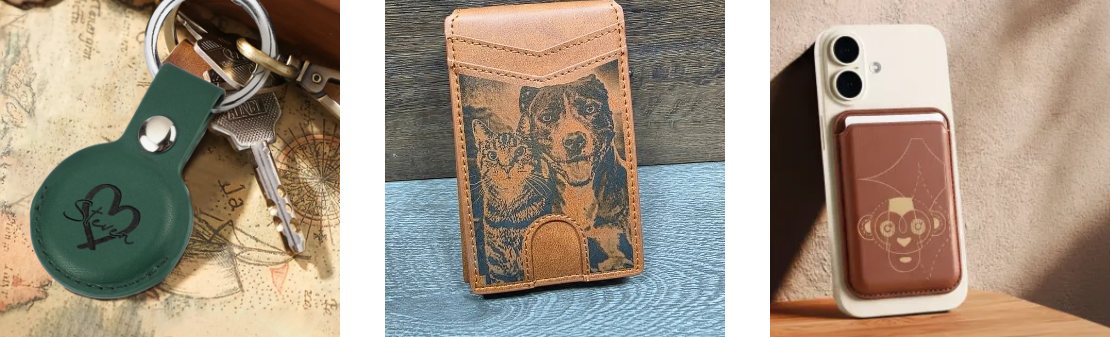
- Engraves and cuts wood, plywood, MDF, and bamboo
- Works well with leather, paper, cardstock, felt, and cork
- Cuts dark and opaque acrylic effectively
- Marks anodized aluminum by removing the colored oxide layer, creating a sharp light-on-dark contrast
- Offers a very affordable entry point, with no laser tube to replace and relatively low maintenance requirements
What a diode laser engraver cannot do
- It generally cannot cut clear or light-colored acrylic effectively, because these materials transmit much of the 450 nm blue wavelength.
- It cannot directly engrave most bare metals effectively without specialized treatment or marking compounds.
- Compared with a CO₂ laser in a similar price range, it generally cuts more slowly and through thinner materials because of its lower available optical power.
- It is not suitable for conventional glass engraving.
Typical power and price
Diode laser engravers commonly offer around 5W–40W of optical output, with prices typically ranging from approximately €200–€2,500, depending on the machine and features. Diode power is specified as optical output, so it should not be compared directly with the electrical or tube wattage used to describe some CO₂ machines. A 20W diode laser and a 20W CO₂ laser are therefore not equivalent in cutting performance.
Best suited to
Diode lasers are a strong choice for makers, educators, hobbyists, small-batch personalization, and beginners who primarily work with wood, leather, dark acrylic, and anodized aluminum without needing the larger investment associated with industrial laser systems. In xTool's lineup, the xTool M2 represents this category.
Fiber Laser Engravers
Wavelength: 1064 nm · Near-infrared
Fiber laser engravers generate their beam inside a rare-earth-doped optical fiber and direct it onto the workpiece through a fast galvanometer scanning head. At 1064 nm, metals absorb the laser energy efficiently, making fiber lasers the standard choice for permanent metal marking and engraving.
Most fiber laser systems use a galvo-based design, allowing the laser head to move the beam rapidly across the marking area without physically moving the entire machine head. This enables significantly faster marking speeds than traditional gantry systems in many applications, especially for detailed metal marking and batch production.
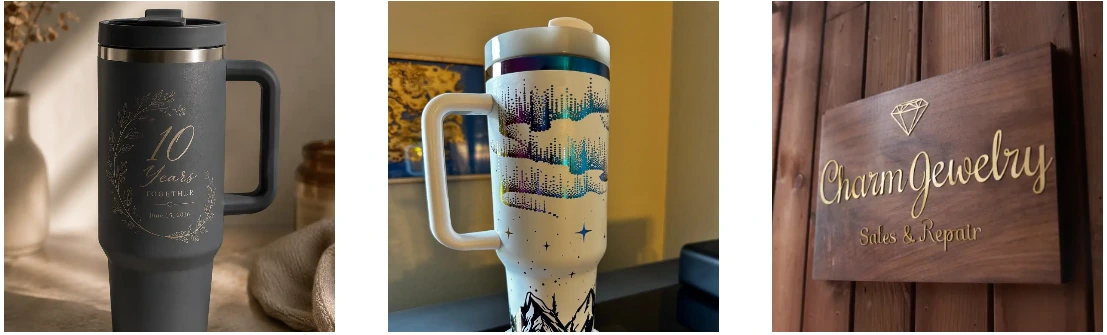
What a fiber laser engraver does well
- Marks and deep-engraves stainless steel, carbon steel, aluminum, titanium, brass, copper, gold, and silver
- Creates permanent, durable marks that can withstand handling, cleaning, and outdoor exposure
- Achieves very high marking speeds, making fiber lasers well suited to batch and production work
- Maintains fine detail for serial numbers, data matrix codes, logos, and intricate artwork
- Requires very few consumables, while the laser source can typically operate for tens of thousands of hours
What a fiber laser engraver cannot do
- Highly reflective metals such as pure copper, gold, and silver are more challenging. They absorb 1064 nm less efficiently than materials such as steel and aluminum, so they may require higher power or slower marking speeds and can create back-reflection concerns.
- It is not suitable for processing materials such as wood, paper, fabric, or most clear plastics, which interact weakly with the 1064 nm wavelength.
- Its marking area is generally limited, often around 100–300 mm depending on the F-theta lens and machine configuration.
- Standard fiber lasers do not provide the same controlled color-marking capabilities as MOPA systems, which offer greater pulse-width control for stainless steel.
- It is primarily a marking and engraving system rather than a thick-stock cutting machine. Deep metal work is performed by removing material progressively rather than cutting through thick sheets.
Typical power and price
Desktop fiber laser machines commonly range from 20W to 60W, with prices roughly around €2,500–€8,000, depending on the source, marking area, enclosure, and other features. For metal applications, higher power generally provides faster marking and greater engraving depth.
Best suited to
Fiber lasers are ideal for jewelry, hardware, tools, knives, industrial components, tumblers, drinkware, and other applications requiring permanent metal marking at production volumes. In xTool's lineup, the F2 Ultra represents this category.
MOPA Laser Engravers
Wavelength: 1064 nm with adjustable pulse width
A MOPA laser engraver (Master Oscillator Power Amplifier) is a specialized type of fiber laser that adds one important capability: adjustable pulse duration. Depending on the laser source, the pulse width can typically be tuned from just a few nanoseconds to several hundred nanoseconds.
Unlike a standard fiber laser, which generally operates with a fixed pulse width, a MOPA system allows the operator to adjust how the laser energy is delivered to the material.
This additional control changes how much heat is transferred to the surface and how quickly that heat dissipates, giving MOPA lasers greater flexibility for applications where a standard fiber laser has more limited control.
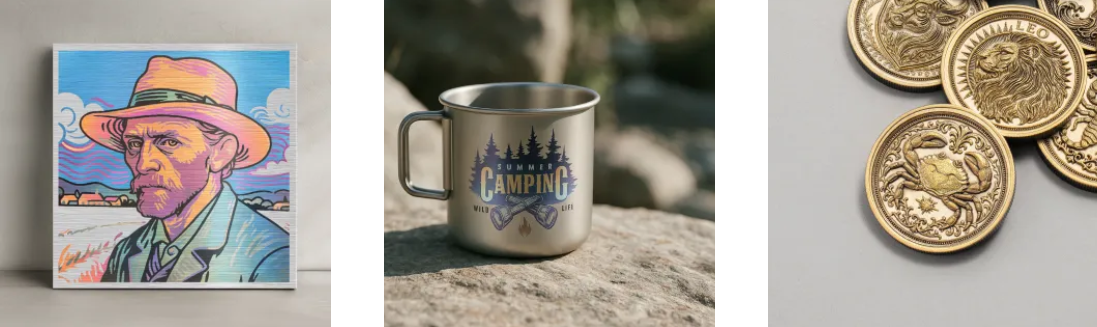
What a MOPA laser engraver does well
- Creates color marks on stainless steel and titanium. Precisely controlled pulses can form a thin oxide layer with specific optical properties, producing colors such as blue, gold, purple, and green without dyes or coatings. Consistent color reproduction depends on carefully controlled heat input, which is one of the key advantages of adjustable pulse width.
- Produces clean black marks on anodized aluminum while preserving the underlying anodized layer, instead of removing it completely as can happen with fixed-pulse fiber lasers.
- Marks thin metals and delicate components with reduced heat impact, helping minimize warping, discoloration, and unwanted burrs.
- Provides greater control over fine details across a broader range of metals, engineering plastics, and coated surfaces.
What a MOPA laser engraver cannot do
- It has many of the same material limitations as a standard fiber laser: it is not designed for wood, paper, fabric, or clear plastics.
- Color marking requires a controlled process for consistent results. Surface finish, material composition, alloy, focus, and laser parameters can all affect the final color, so production applications usually require testing and parameter adjustment.
- It generally costs more than a fixed-pulse fiber laser with the same rated power, due to the additional control offered by the MOPA source.
Typical power and price
MOPA laser engravers commonly range from 20W to 100W, with prices roughly around €4,000–€12,000 depending on the laser source, machine configuration, working area, and included features. A MOPA system can typically command a significant premium over a comparable fixed-pulse fiber laser.
Best suited to
MOPA lasers are particularly well suited for color-marked stainless-steel products, premium anodized aluminum items, jewelry, high-value consumer electronics, and applications where the laser mark is part of the product's visual design rather than simply an identification mark. In xTool's lineup, MOPA capability is available on the F2 Ultra.
UV Laser Engravers
Wavelength: 355 nm · Ultraviolet
UV laser engravers operate at a wavelength of 355 nm, typically generated by converting a 1064 nm laser source through frequency tripling. At this shorter wavelength, the laser interacts with materials differently from infrared lasers, allowing energy to break molecular bonds with much less reliance on heat.
This process is often described as “cold marking” because it produces an extremely small heat-affected zone. The result is highly precise marking with minimal thermal damage, making UV lasers particularly useful for delicate, heat-sensitive, and high-value materials.
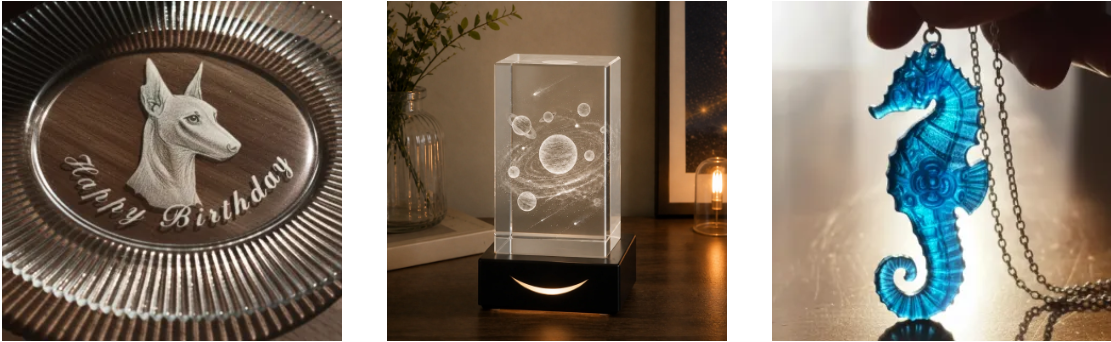
What a UV laser engraver does well
- Marks glass and crystal with minimal micro-cracking, making it suitable for delicate transparent materials.
- Processes ceramics, stone, and other brittle materials with precise, clean results.
- Marks plastics such as ABS, polycarbonate, PET, and silicone with high contrast while minimizing melting, discoloration, and burning.
- Works on PCBs, flexible circuits, and medical-device components where controlling thermal damage is especially important.
- Processes flexible circuits, thin films, and FPC materials with precise cuts and fine features that can be difficult to achieve with infrared lasers.
- Creates extremely small features, including micro-holes and fine scribed patterns, for applications requiring micron-level precision.
- Produces exceptionally fine engraving detail because UV wavelengths allow very small focused spot sizes.
- Works across a broad range of materials, including both metals and non-metals, making it one of the most versatile laser sources for precision marking.
What a UV laser engraver cannot do
- It is not designed for cutting thick materials. Most UV systems are optimized for precision surface processing rather than high-volume material removal.
- It is unsuitable for thick stock, regardless of whether the material is metal, plastic, or another substrate.
- UV optical components generally require more careful maintenance and can have higher replacement costs than those used in fiber systems.
- It has the highest cost per watt among the major desktop laser categories, reflecting the complexity of the UV laser source and optics.
Typical power and price
UV laser engravers commonly operate in the 3W–10W range. Although these power ratings appear low compared with CO₂ or fiber lasers, the shorter 355 nm wavelength allows efficient processing of many sensitive materials at relatively low power. Prices typically range from approximately €6,000–€20,000, depending on the laser source, enclosure, working area, and machine configuration.
Best suited to
UV lasers are particularly well suited for glassware, crystal awards, cosmetic and pharmaceutical packaging, electronics, medical devices, precision components, and premium plastic products. In xTool's lineup, the F2 Ultra UV represents this category.
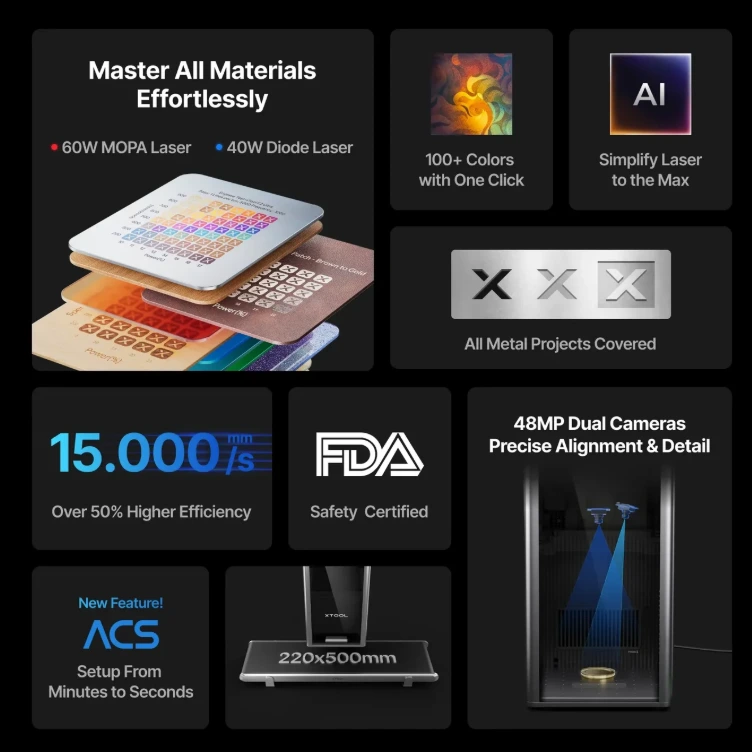
Laser Engraver Comparison Chart
| Feature | CO₂ | Diode | Fiber | MOPA | UV |
|---|---|---|---|---|---|
| Wavelength | 10.6 µm | 450 nm | 1064 nm | 1064 nm, tunable pulse width | 355 nm |
| Typical power | 40–150 W | 5–40 W | 20–60 W | 20–100 W | 3–10 W |
| Primary strength | Non-metal cutting | Affordable entry | Metal marking | Color metal marking | Cold, fine-detail marking |
| Metals | With coating | With coating | ✓ | ✓ | ✓ |
| Wood & organic materials | ✓ | ✓ | ✕ | ✕ | Engraving only |
| Clear acrylic | ✓ | ✕ | ✕ | ✕ | Engraving only |
| Glass | Frosting only | ✕ | ✕ | ✕ | ✓ |
| Cutting ability | Strong | Moderate | Thin metal only | Thin metal only | Thin films only |
| Detail level | Moderate | Moderate | High | High | Highest |
| Maintenance | Tube has finite life; optics may require alignment | Minimal | Very low | Very low | Optics require periodic replacement |
| Price range | €2,000–8,000 | €200–2,500 | €2,500–8,000 | €4,000–12,000 | €6,000–20,000 |
Which Laser for Which Process?
The material table answers "what can this machine touch." This one answers "what job am I doing."
| Process | Best choice | Also works | Not suitable |
|---|---|---|---|
| Cutting thick non-metals, large format | CO₂ | Diode (thinner, slower) | Fiber, MOPA, UV |
| Cutting dark acrylic and thin wood on a budget | Diode | CO₂ | Fiber, MOPA, UV |
| Cutting thin metal sheet | Fiber | MOPA | CO₂, Diode, UV |
| Cutting film, FPC, and circuit board | UV | — | CO₂, Diode, Fiber, MOPA |
| Engraving wood, leather, and acrylic | CO₂ | Diode | Fiber, MOPA |
| Marking bare metal | Fiber | MOPA, UV | CO₂, Diode |
| Color marking on stainless and titanium | MOPA | — | All others |
| Black marking on anodized aluminum | MOPA | Fiber, Diode | CO₂ |
| Marking glass, crystal, and ceramic | UV | CO₂ (frosting only) | Diode, Fiber, MOPA |
| Marking heat-sensitive plastics | UV | MOPA | CO₂, Diode |
| Micro-drilling and micron-scale detail | UV | MOPA | CO₂, Diode |
Read the two tables together: the material table rules out what a source physically cannot do, and this one tells you which of the remaining options is actually the right tool for the job.
How to Choose the Right Laser Engraver
Work through the option that best matches the materials you work with and the type of products you want to make.
Choose a CO₂ laser engraver if:
- Cutting is your primary task rather than simple marking
- You mainly work with wood, acrylic, leather, paper, or fabric
- You need to cut clear acrylic, which is difficult or impossible for most other laser types
- Your projects require a larger working area than a typical galvo system provides
- You want strong cutting performance and good value for non-metal materials
Choose a diode laser engraver if:
- You are just getting started and keeping costs low is important
- Your main materials are wood, leather, paper, and anodized aluminum
- You want a compact machine that can fit comfortably on a desk
- You prefer minimal maintenance and no laser tube replacement
- You do not need to work with clear acrylic or directly mark bare metal
Choose a fiber laser engraver if:
- Metal is your primary material
- You need permanent marks that can withstand wear, cleaning, and outdoor exposure
- You work with batches where fast marking speeds are important
- Your parts fit within a typical 100–300 mm marking field
- You need precise details such as serial numbers, data matrix codes, or fine artwork
Choose a MOPA laser engraver if:
- You want to create color marks on stainless steel or titanium
- You work with anodized aluminum and want clean black marks without removing the anodized layer
- You work with thin or delicate parts where controlling heat and distortion is important
- The laser mark is part of the product's design rather than simply an identification mark
- You are willing to invest more than you would for a standard fiber laser
Choose a UV laser engraver if:
- You work with glass, crystal, ceramic, or other delicate materials
- You need to mark plastics that may melt, burn, or discolor under infrared lasers
- You process electronics, PCBs, flexible circuits, or medical components
- You need extremely fine detail and precision
- Your applications are primarily surface marking and precision processing rather than cutting thick materials
Remember: choosing the right light source is only part of selecting a laser engraver. Working area, movement system, marking speed, precision, and edge quality are also determined by the machine's mechanical design. The choice between gantry and galvo is therefore another important factor to consider.
When One Laser Isn't Enough
Looking at the material comparison, one thing becomes clear: no single laser wavelength can handle every type of material equally well. CO₂ lasers excel at non-metal cutting but struggle with bare metals. Fiber and MOPA lasers are designed for metal but are not suitable for materials such as wood. UV lasers can process materials that other sources struggle with, but they are not intended for cutting thick stock.
For most users, there are three practical approaches.
1. Specialize
Choose the laser source that covers the majority of your work and outsource or decline jobs outside its capabilities. For many businesses, this is the simplest and most cost-effective approach.
2. Run Two Machines
A CO₂ or diode laser for cutting combined with a fiber laser for metal marking is one of the most practical combinations for small businesses. Together, they cover a broad range of common materials and applications.
The trade-off is that you have two machines, two work areas, potentially separate software workflows, and two maintenance schedules.
3. Use a Multi-Source Platform
Some modern laser machines combine multiple laser sources in a single system. A common configuration pairs a diode or CO₂ source for non-metal cutting with a fiber source for metal marking.
This approach can provide one machine, one workspace, and a more unified workflow while covering a much wider range of materials. The initial investment is higher than a single-source machine, but it can be more practical than purchasing and maintaining two separate systems.
Which Approach Makes Sense?
The best choice depends less on the machine's price and more on how diverse your material and product range is.
- One main material or product: Specialize.
- Wood and metal products: Consider two machines.
- A wide range of materials and limited workspace: A multi-source platform may be worth considering.
The goal is not to find the most powerful laser. It is to choose the combination of laser sources that matches the work you actually do.
Frequently Asked Questions
What are the different types of laser engravers?
The five types you'll encounter on the desktop and small-business market are CO₂ (10.6 µm), diode (450 nm), fiber (1064 nm), MOPA (1064 nm with adjustable pulse width), and UV (355 nm). Each is defined by its wavelength, which determines which materials absorb the beam and therefore which materials the machine can process.
What is the difference between a CO₂ and a fiber laser engraver?
Wavelength, and everything that follows from it. CO₂ emits at 10.6 µm, which organic materials absorb strongly — so it cuts wood, acrylic, and leather but reflects off bare metal. Fiber emits at 1064 nm, which metals absorb efficiently — so it marks steel and aluminum but passes through wood and clear plastic. CO₂ is a cutting tool for non-metals; fiber is a marking tool for metals.
What is the difference between a diode and a CO₂ laser engraver?
Both process similar organic materials, but a CO₂ laser engraver is significantly more capable and significantly more expensive. CO₂ cuts thicker stock, cuts faster, and — critically — cuts clear acrylic, which a 450 nm diode passes straight through. Diode machines cost a fraction as much, need less maintenance, and take up less space, which makes them the standard entry point.
Which type of laser engraver is best for metal?
Fiber for general metal marking and engraving; MOPA if you need color marking on stainless or titanium, or clean results on thin and delicate parts; UV if the metal part also carries plastic or glass components that cannot take heat. CO₂ and diode lasers cannot mark bare metal without a sacrificial coating.
Can a diode laser engraver cut clear acrylic?
No. Clear acrylic is transparent at 450 nm, so the beam passes through the sheet without depositing energy. Dark and opaque acrylic cuts normally, because the pigment absorbs the blue light. Cutting clear acrylic requires a CO₂ laser.
What is a MOPA laser engraver, and how is it different from a fiber laser?
MOPA stands for Master Oscillator Power Amplifier. It is a fiber laser whose pulse width can be adjusted rather than fixed, which gives precise control over how much heat reaches the material. That control enables color marking on stainless steel and titanium, clean black marking on anodized aluminum, and distortion-free marking on thin parts — none of which a fixed-pulse fiber source can reliably produce.
What can a UV laser engraver do that the others can't?
Process materials that heat destroys. At 355 nm the beam breaks molecular bonds directly instead of burning material away, leaving a minimal heat-affected zone. That makes UV the only practical choice for glass and crystal without micro-cracking, for plastics that melt under infrared, and for PCBs, flexible circuits, and medical components where thermal damage is unacceptable.
Can a laser engraver mark copper, gold, or silver?
Yes, with a fiber or MOPA source — but more slowly than on steel. These metals reflect 1064 nm far more than stainless does, so the same job needs more power and more passes, and some machines limit output on highly reflective material to protect the source from back-reflection. CO₂ and diode lasers cannot mark them at all without a coating.
Which laser engraver is best for beginners?
A diode machine, in almost every case. It costs the least, needs the least maintenance, requires no tube replacement, and covers the materials most people start with — wood, leather, paper, and anodized aluminum. Move to CO₂ when you need clear acrylic or faster cutting, and to fiber when metal becomes central to your work.
Can one laser engraver handle every material?
No single wavelength can. UV comes closest in material range but cannot cut anything thick. The practical workarounds are to specialize in one source, run two complementary machines, or use a multi-source platform that combines more than one light source in a single frame.
The Bottom Line
Wavelength is the key specification that determines what a laser engraver can and cannot process. Increasing the wattage does not change how a material interacts with a particular wavelength.
- CO₂ delivers the strongest cutting performance for non-metal materials.
- Diode offers an affordable entry point and handles many common maker materials.
- Fiber provides fast, permanent marking and engraving on metals.
- MOPA adds adjustable pulse control, enabling applications such as color marking on suitable metals.
- UV provides precise, low-heat processing for delicate materials that are difficult for other laser sources to handle.
The best way to choose a laser is to start with your material list, not your budget. Identify the materials and products you work with most often, then choose the laser source that covers the majority of those applications.
Finally, check the comparison tables above for materials your chosen laser cannot handle. Those limitations—not simply the machine's price or wattage—should ultimately guide your decision.